Technology is supposed to make a business more efficient.
Software should reduce manual work, improve reporting, strengthen communication, and help employees accomplish more.
But in many businesses, technology gradually becomes another source of unnecessary expense.
Subscriptions renew automatically. Employees stop using licenses that remain active. Different departments purchase tools with overlapping features. Systems fail to communicate, forcing people to transfer information manually.
The result is a growing collection of recurring expenses that may deliver less value than management expects.
Software subscription costs include more than monthly licensing fees. Businesses must also consider unused seats, duplicate applications, implementation expenses, integration problems, training, and productivity losses.
Some of these costs are easy to identify on a financial statement.
Others are hidden within payroll, operational inefficiencies, and the time employees spend working around disconnected systems.
The objective is not simply to purchase fewer software products.
It is to ensure that every technology expense supports a measurable business purpose.
What Are Software Subscription Costs?
Software subscription costs are the recurring payments a business makes to access software products or services.
Common examples include:
- Accounting and bookkeeping platforms
- Customer relationship management systems
- Project management software
- Communication and collaboration tools
- Marketing automation platforms
- Human resources and payroll systems
- Cloud storage services
- Reporting and analytics applications
- AI-powered productivity tools
Subscriptions may be billed monthly or annually.
Some charge per user, while others use pricing based on features, usage, transactions, storage, or another measure.
A subscription costing $50 per month may appear insignificant.
But when multiple departments independently purchase software, those recurring charges can become a substantial operating expense.
For example, a company paying for 25 software subscriptions at an average of $150 per month would spend:
25 × $150 × 12 = $45,000 annually
That figure represents direct subscription spending only.
It does not include implementation, training, integration, support, or the costs of inefficient workflows.
The Hidden Software Costs Businesses Often Overlook
The most visible technology expenses appear on invoices, corporate credit cards, and accounts payable records.
The more difficult costs are associated with how software is actually used.
1. Unused or Underutilized Licenses
A business may pay for more user licenses than employees need.
This can happen when employees leave, departments change, or the original software requirements decrease.
Suppose a company pays for 15 unused licenses at $45 per user each month.
Annual Unused License Cost = Unused Seats × Monthly Price × 12
15 × $45 × 12 = $8,100 annually
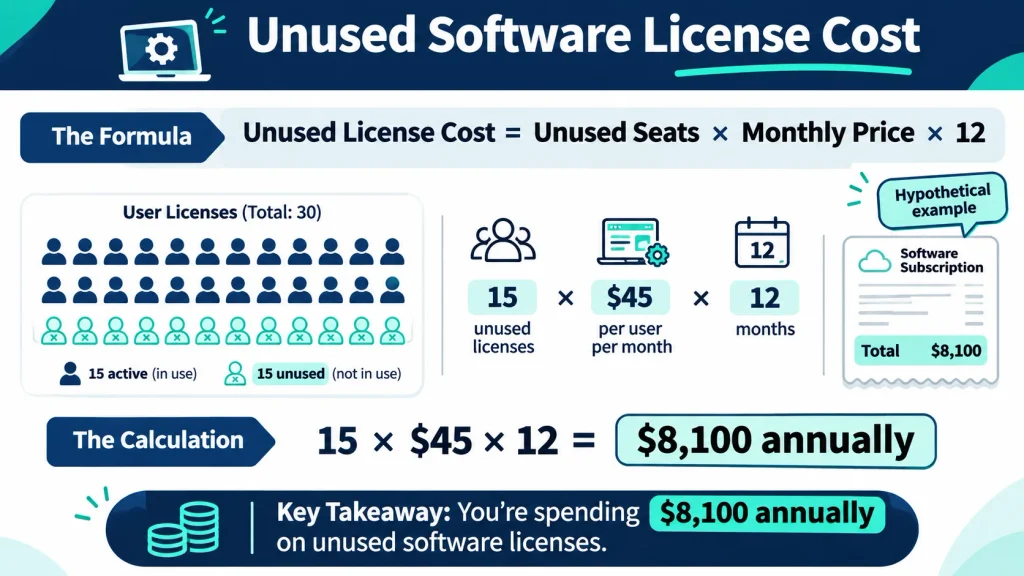
The company spends $8,100 on licenses that are not providing a corresponding benefit.
However, an inactive license should not automatically be canceled.
Some users may need occasional access for periodic reporting, administrative responsibilities, or business continuity.
Management should confirm whether the license is actually unnecessary before reducing the subscription.
2. Duplicate Software Subscriptions
Different departments may use separate platforms that perform similar functions.
For example:
- Sales and marketing maintain different customer databases.
- Multiple teams pay for separate project management tools.
- Employees use several reporting platforms.
- Departments purchase overlapping communication applications.
Some duplication may be justified by specialized needs.
The problem occurs when the business pays for multiple products without a clear operational reason.
Consolidation may reduce recurring expenses, but management must consider migration costs, compatibility, training, and the risk of losing important functionality.
3. Disconnected Systems and Manual Work
One of the most expensive technology problems can be the additional labor required when systems do not communicate.
Employees may repeatedly:
- Export information from one application
- Reformat spreadsheets
- Enter the same data into another system
- Reconcile inconsistent records
- Correct errors from manual transfers
This activity is sometimes called swivel-chair work because employees move between disconnected applications to complete a process.
The direct cost may not appear in the software budget.
Instead, it is reflected in employee time.
Example: Calculating the Cost of Manual Data Entry
Assume a business has 10 employees who each spend two hours per week transferring information between systems.
Use the following hypothetical assumptions:
| Cost Component | Amount |
| Employees affected | 10 |
| Hours spent per employee weekly | 2 |
| Working weeks annually | 46 |
| Estimated hourly employment cost | $52 |
Annual time spent:
10 × 2 × 46 = 920 hours
Estimated annual labor capacity used:
920 × $52 = $47,840
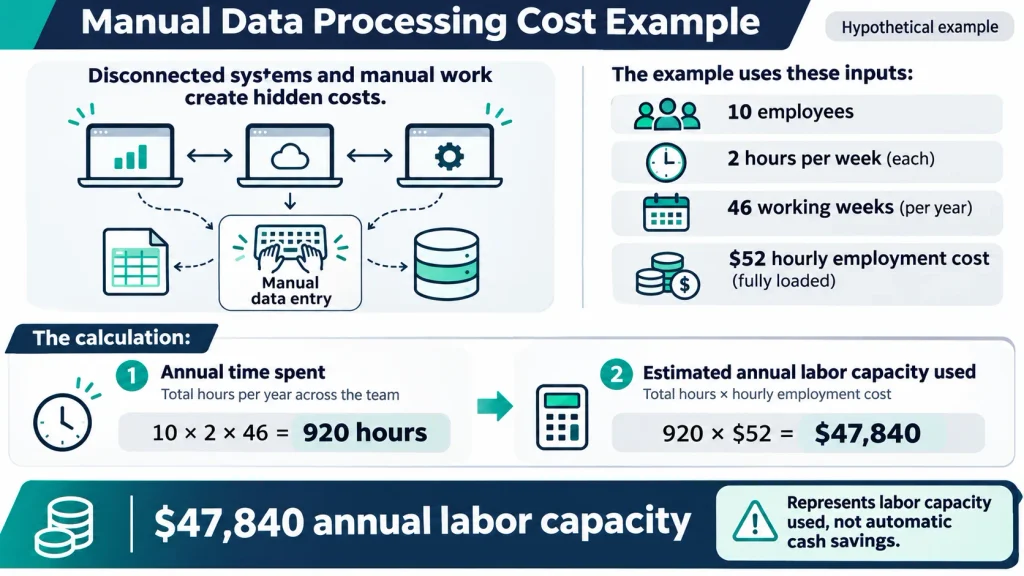
This represents approximately $47,840 in annual labor capacity allocated to the process.
It does not automatically represent $47,840 in avoidable cash expenses.
The financial benefit of eliminating the work depends on whether the company can reduce paid labor costs, avoid hiring additional employees, or redirect recovered capacity toward productive activities.
That distinction is essential when evaluating software integration investments.
4. Downtime and Slow Applications
Slow or unreliable software can interrupt normal operations.
Employees may wait for systems to load, repeat failed transactions, or delay customer requests.
These problems can affect productivity and service quality.
Management should measure actual incidents, time lost, and operational effects rather than assigning a speculative cost to every interruption.
5. Training and Implementation Expenses
Introducing software requires more than paying the subscription fee.
Costs may include:
- Initial configuration
- Data migration
- Employee training
- External implementation specialists
- System integration
- Support requirements
- Internal management time
These costs should be included when comparing software options.
A lower subscription fee may not produce a lower total cost if implementation and ongoing support are significantly more expensive.
6. Security and Compliance Exposure
Unapproved or poorly managed applications can create data security and compliance risks.
For example, a departed employee may retain access to a business application containing customer information.
Some businesses may also fail to track software licensing requirements appropriately.
These exposures should be assessed with qualified technology and security personnel.
Not every risk can be converted into a precise expected cost, but it should still influence technology purchasing and governance decisions.
How to Calculate the True Cost of Business Software
A useful software cost assessment considers both direct spending and measurable economic effects.
A practical framework is:
Total Software Cost = Subscription Fees + Implementation + Training + Integration + Support + Measurable Productivity Costs
Avoid counting expenses twice.
For example, if an integration project already includes internal employee implementation time, that time should not be added again under a separate category.
Example: Annual Software Cost Assessment
Consider a hypothetical business with the following annual technology costs.
| Cost Category | Amount |
| Software subscription fees | $48,000 |
| External implementation and support | $8,000 |
| Employee training | $4,000 |
| Measured manual data processing capacity | $20,000 |
| Total Estimated Economic Cost | $80,000 |
In this example, direct subscription payments account for $48,000.
The additional $32,000 represents implementation, training, and the economic value of employee capacity used in manual processes.
The full $80,000 is not necessarily an accounting expense or a potential cash saving.
For management decisions, separate:
Direct cash expenditures: Subscription invoices, external fees, and other additional cash payments.
Internal labor costs: Employee time already included in payroll.
Opportunity costs: Productive work the business could potentially accomplish if inefficient processes were improved.
This separation makes the financial analysis more reliable.
How to Reduce Software Subscription Costs Without Hurting Productivity
Reducing software spending should begin with understanding what the business needs each product to accomplish.
A company should not cancel an important system simply because it appears expensive.
Instead, evaluate the actual value received.
Step 1: Identify the Largest Recurring Expenses
Review vendor charges and determine which applications account for the greatest annual spending.
Prioritize material costs rather than spending management time investigating every minor charge.
Step 2: Compare Licenses With Actual Usage
Determine how many licenses the company pays for, how many are assigned, and how the applications are used.
Review usage over a period appropriate to the business function.
A quarterly reporting tool may be important even if it is rarely accessed.
Step 3: Identify Overlapping Capabilities
Look for applications that perform substantially similar functions.
Determine whether consolidating them would reduce costs without creating operational problems.
Step 4: Review the Cost of Inefficient Workflows
Ask employees where they repeatedly enter, export, reconcile, or correct information between systems.
Estimate the time involved using observable workflows.
Focus on activities that consume significant resources or create frequent errors.
Step 5: Evaluate the Financial Benefit of Changes
Potential actions may include:
- Removing unused licenses
- Downgrading unnecessary premium plans
- Consolidating duplicate platforms
- Negotiating appropriate renewal terms
- Improving integrations
- Redesigning inefficient workflows
- Replacing software that no longer meets business needs
Evaluate implementation costs and risks before acting.
For a dedicated process covering subscription inventory and renewal reviews, see our SaaS subscription audit guide.
Is Software Integration Worth the Investment?
Sometimes the biggest opportunity is not reducing the number of software subscriptions.
It is making existing systems work together more effectively.
Consider the earlier example in which manual data entry consumes approximately $47,840 in annual employee capacity.
Suppose the business is considering an integration project costing $20,000.
If the project eliminates the full manual workload and the company can convert all recovered capacity into measurable financial benefits, the simplified payback would be:
Payback Period = Initial Investment ÷ Annual Financial Benefit
$20,000 ÷ $47,840 = 0.42 years
That is approximately five months.
However, this result depends on several assumptions.
The company must be able to recover the expected time, the integration must work as intended, and the financial value of recovered capacity must be realizable.
If the integration creates $5,000 in additional annual maintenance costs, the expected net annual benefit under the same assumptions becomes:
$47,840 − $5,000 = $42,840
The simplified payback would increase to approximately 5.6 months.
If the recovered time cannot be converted into cash savings or measurable additional output, the economic return may be lower.
This is why integration decisions should be evaluated as investments rather than justified solely by estimated time savings.
Monthly Subscriptions vs. Perpetual Software Licenses
Software subscriptions are not inherently worse than perpetual licenses.
Each purchasing model has advantages and limitations.
| Consideration | Subscription Software | Perpetual License |
| Upfront cost | Often lower | Often higher |
| Recurring payments | Usually required | Support or maintenance may be recurring |
| Updates | Often included | May require maintenance agreements or additional purchases |
| Hosting | Often vendor-managed | Depends on product |
| Long-term cost | Depends on ongoing fees and use | Depends on purchase, maintenance, hosting, and upgrades |
| Flexibility | May allow changes in plans or user counts | Governed by license terms |
A business comparing the two should evaluate total cost over the expected useful period, not simply compare the first payment.
For example, a $300 monthly subscription costs $18,000 over five years before price increases.
A $7,500 perpetual license may initially look less expensive.
However, the perpetual-license option could require additional maintenance, hosting, support, infrastructure, and upgrade expenses.
The appropriate comparison is based on the complete ownership cost and the value delivered by each option.
Software selection should reflect business requirements, security, support, integration, and financial sustainability.
How Often Should Businesses Review Their Software Spending?
A quarterly review can help identify changes in software usage, staffing, and recurring expenses.
A more comprehensive annual review can evaluate whether the overall technology environment still supports business objectives.
Useful financial and operational indicators include:
- Total annual subscription spending
- Software spending by department
- Cost per active user
- Percentage of unused paid licenses
- Duplicate application spending
- Upcoming renewal commitments
- Implementation and support costs
- Manual processing hours
- Measurable productivity improvements
The objective is to understand whether technology spending is producing value.
Businesses should also maintain clear responsibility for software purchasing and renewal decisions.
For specialized license reconciliation, see our software license audit guide.
What a CFO Should Ask About Software Subscription Costs
A CFO should approach technology spending as a financial management issue, not simply an IT purchasing decision.
Five questions can guide the discussion.
1. What Business Problem Does This Software Solve?
Each application should support a clearly defined function.
The business should understand what would happen if the product were unavailable.
2. Are We Paying for Capacity We No Longer Need?
Compare purchased licenses, assigned users, and actual usage.
Determine whether the business can reduce spending without affecting important operations.
3. Does This Software Create Additional Work?
Investigate manual transfers, repeated data entry, reporting inconsistencies, and other inefficient processes.
4. What Is the Total Cost of Ownership?
Include subscriptions, implementation, training, integration, support, and relevant internal resource requirements.
5. What Is the Financial Return?
Evaluate expected cost savings, additional productive capacity, avoided expenses, and other measurable benefits.
A useful decision should compare financial value against total cost and business risk.
The goal is not necessarily the smallest software budget.
It is to create a technology environment that supports business performance at a reasonable cost.
How Fractional CFO Services Help Control Hidden Technology Costs
Software expenses can become difficult to manage when purchasing decisions are spread across departments.
An owner may understand the cost of individual subscriptions without having a clear picture of the company’s total technology spending.
Financial leadership can help connect recurring expenses to budgets, operating performance, and investment decisions.
Depending on the engagement, a fractional CFO may help management:
- Evaluate software spending trends
- Identify significant recurring expenses
- Assess financial impacts of process inefficiencies
- Compare technology investments
- Evaluate expected financial returns
- Improve cost visibility
- Establish financial accountability
- Prioritize investments and savings opportunities
This work should complement the responsibilities of IT, operations, procurement, and security specialists.
Business CFO For Hire provides fractional CFO services to help growing businesses improve financial visibility, profitability, and strategic decision-making.
Frequently Asked Questions About Software Subscription Costs
What are software subscription costs?
Software subscription costs are recurring payments made to access software products or services. They may include monthly or annual fees based on users, features, usage, or other pricing arrangements.
Why do software subscription costs increase?
Costs can increase because of additional users, new applications, higher subscription prices, premium features, duplicate tools, or expanded usage.
How can businesses reduce software subscription expenses?
Businesses can review unused licenses, eliminate unnecessary duplication, evaluate subscription plans, negotiate renewal terms, and improve inefficient workflows.
How do you calculate annual software subscription costs?
Multiply monthly subscription fees by 12 and add applicable annual fees and other recurring charges. Include implementation and support costs when evaluating total economic cost.
Are unused software licenses a business expense?
Businesses may continue paying for licenses that are not actively used. The accounting treatment depends on the contract and relevant rules, but unused licensing capacity can represent avoidable spending.
What are hidden software costs?
Hidden software costs may include manual work caused by disconnected systems, training requirements, operational downtime, implementation expenses, and productivity losses.
Are monthly subscriptions cheaper than purchasing software licenses?
Not necessarily. Subscriptions may have lower upfront costs, while perpetual licenses may require larger initial payments. Total cost depends on maintenance, hosting, upgrades, support, and expected years of use.
How often should software subscriptions be reviewed?
Quarterly reviews can help identify changes in usage and spending. More comprehensive reviews may also be useful before major renewals, organizational changes, or technology investments.
Final Thoughts: Technology Should Create Value, Not Just Another Expense
Software can improve productivity, customer service, financial reporting, and operational performance.
But these benefits do not happen automatically.
Unused licenses, duplicate subscriptions, disconnected systems, and inefficient processes can create costs that remain unnoticed when management focuses only on monthly invoices.
The real financial question is not simply how much the company spends on software.
It is whether that spending creates measurable business value.
A disciplined review should separate direct subscription expenses from labor-related inefficiencies, evaluate opportunities for improvement, and consider the full costs of making changes.
Some businesses may benefit from reducing subscriptions.
Others may create greater value by investing in integrations or replacing outdated systems.
The objective is not to use less technology. It is to make technology work harder for the business.
If your business is struggling to understand its operating expenses, technology investments, or financial performance, experienced financial leadership can help evaluate the numbers behind those decisions.
Schedule a free CFO strategy call with Business CFO For Hire to discuss your financial management priorities.